If you're a brick-and-mortar business, Google Maps SEO isn't just a marketing tactic—it's how you get found. It's the entire process of optimizing your online presence to show up higher in local searches on Google Maps. This isn't about abstract digital visibility; it’s about turning searches into real-world foot traffic.
Why Google Maps SEO Is Your Local Growth Engine
Think Google Maps is just for getting from point A to point B? Think again. It has become the discovery engine for local businesses—a modern-day yellow pages, review site, and business directory all rolled into one. For any business with a physical storefront, from a multi-location retailer to a local wellness studio, mastering Google Maps SEO is no longer optional. It's a core revenue strategy.
When a customer searches for "best coffee near me" or "dispensary in my city," they aren't just browsing. They have immediate intent. They're ready to make a decision and take action, often within minutes. Showing up in the Google "Map Pack"—those top three local results—puts your business directly in front of this high-intent traffic at the exact moment they need you.
The Direct Line from Search to Sale
Let's look at the numbers. A staggering 46% of all monthly Google searches carry local intent. That’s almost half of all searches. And here’s the kicker: 86% of those people specifically fire up Google Maps to find a business's location.
It gets better. A whopping 76% of users who search for something nearby on their phone end up visiting a physical store within 24 hours. You can learn more about these compelling local search statistics and see the data for yourself.
This direct path from a search query to a store visit is what makes Google Maps SEO so incredibly powerful. It completely bypasses the long, drawn-out sales funnels and connects you straight to customers who are ready to buy.
Think of it this way: a high ranking on Google Maps is the digital equivalent of having the best storefront on the busiest street in town. It guarantees you get seen, drives people through your doors, and gives you a massive advantage over competitors just a pin-drop away.
The table below breaks down just how closely local search activity is tied to real customer actions.
Connecting Local Searches to Customer Actions
This table illustrates the direct link between a user's local search and the high-value actions they take, underscoring the importance of Google Maps visibility.
| Local Search Statistic | Resulting Customer Action | Impact on Business |
|---|---|---|
| 86% of people look up a business on Google Maps. | Clicks for directions, calls the business, or visits the website. | Increased foot traffic, direct leads, and pre-qualified customers. |
| 78% of local searches on mobile result in an offline purchase. | Customer visits the store and makes a purchase. | Direct increase in in-store revenue. |
| 60% of smartphone users have contacted a business directly from search results. | Calls, messages, or books an appointment via the "Call" or "Message" button. | Higher lead generation and appointment bookings. |
Ultimately, a strong Google Maps SEO strategy ensures you are not just found, but chosen.
Turning Clicks into Customers
Every single feature within your Google Business Profile is built to convert a searcher into a customer. These aren't just vanity metrics; they're tangible outcomes that directly impact your bottom line.
- Phone Calls: The big "Call" button is a direct line to your business, turning a quick search into an immediate lead or a booked appointment.
- Direction Requests: This is one of the strongest signals of intent. More requests mean more people are planning to walk through your door.
- Website Visits: People click through to your site to get more details, check out a menu, or browse your products before they commit to a visit.
By optimizing your presence, you're sending all the right signals of trust and relevance that both Google’s algorithm and your future customers are looking for.
How the Google Maps Ranking Algorithm Works
Ranking on Google Maps isn't black magic. It's about understanding what Google wants and giving it exactly that. Google's one and only goal is to serve up the most helpful, accurate answer to a local search. To do that, its algorithm is built on three core pillars: relevance, distance, and prominence.
Think of it like this. Someone searches "vegan tacos near me." First, Google scans for businesses that are a relevant match—places that actually mention "vegan tacos" on their menu, in their services, or in customer reviews.
Next, it considers distance. Pretty straightforward—it prioritizes spots that are closer to the searcher. Finally, it looks at prominence, which is just Google's fancy way of measuring how well-known and trusted a business is in the real world. It's about your digital reputation.
This isn't just about vanity rankings; it's about driving real customers through the door.
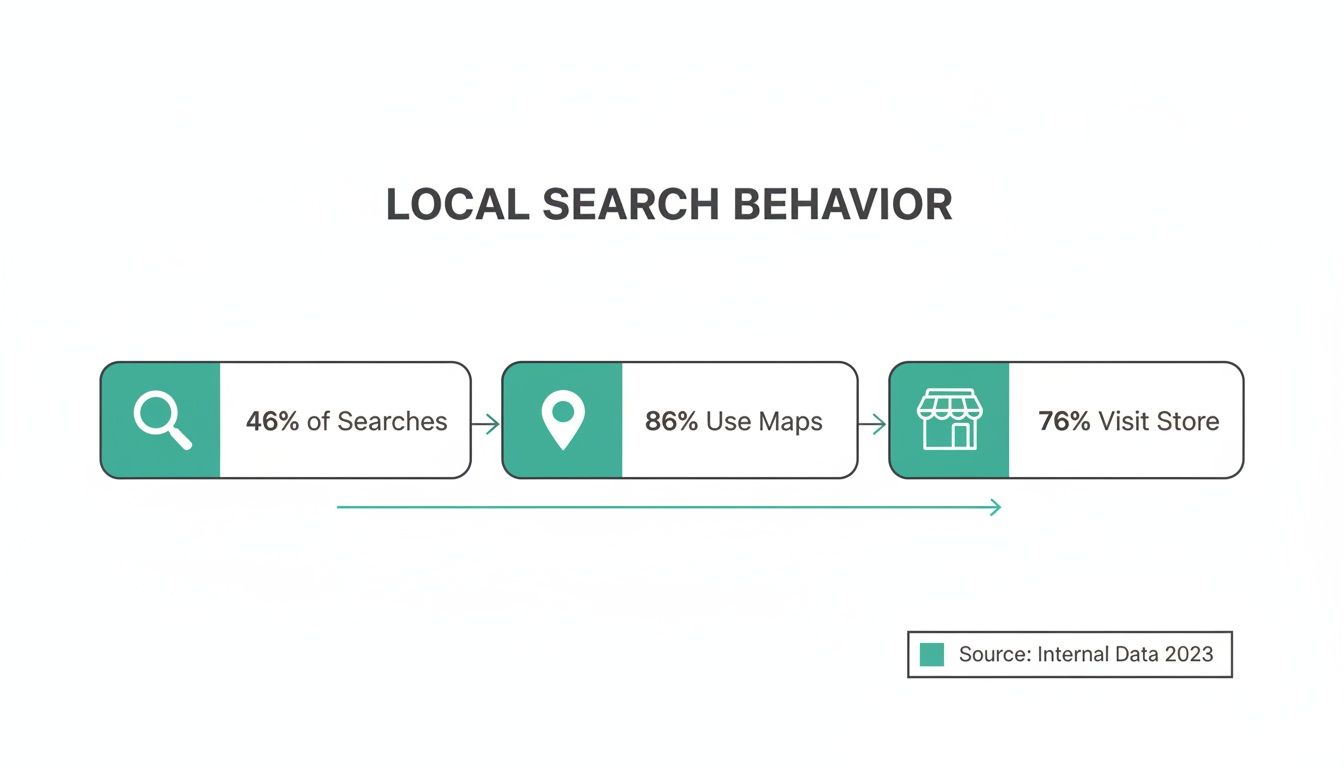
As you can see, local search has incredible intent. People aren't just browsing; they're looking for a place to go right now. Showing up on Maps is a direct line to foot traffic.
Breaking Down the Three Pillars
Let's unpack what each of these pillars actually means for your strategy.
Relevance: This is all about how well your business profile matches what a person is looking for. A complete, detail-rich Google Business Profile (GBP) is your best friend here. If you’ve meticulously filled out your categories, services, products, and attributes, you’re making it incredibly easy for Google to connect you with the right searchers.
Distance: This one is simple. It's the physical distance between your business and the person searching. You can't just pick up your shop and move it, but you can make sure your service areas are clearly defined and you’re optimizing your website content for all the neighborhoods you serve.
Prominence: Here's where the real work—and the real opportunity—lies. Prominence is Google’s measure of your authority and reputation. It's not just about what you say about yourself; it's about what the rest of the web says about you.
Google looks at a ton of signals to figure this out, including:
- Reviews: The number of reviews you have, how positive they are, and how frequently you're getting new ones.
- Citations: Mentions of your business Name, Address, and Phone number (NAP) across other reputable websites and directories.
- On-Page SEO: Local signals from your own website, especially from well-built local landing pages.
- Engagement: Proof that real people are interacting with your listing—think clicks to call, requests for driving directions, and views on your photos.
A business with high prominence is one that Google views as a trusted, popular, and legitimate player in its local market. It's the digital version of having a great word-of-mouth reputation.
The Anatomy of Ranking Signals
So, where should you focus your time? The data gives us a clear roadmap.
When you look at the anatomy of what actually moves the needle in the Local Pack and Maps, Google Business Profile signals are the undisputed champion, accounting for a massive 32% of ranking influence. This is everything from your business hours and photos to Q&As and weekly posts.
Reviews are a close second at 20%, but it’s not just about the star rating anymore. Google now looks at "review velocity" (how fast you're getting them) and whether they contain relevant keywords. On-page signals from your website make up 15%, which underscores the need for hyperlocal content.
And don't sleep on behavioral signals. The clicks, calls, and direction requests that prove real-world engagement account for 9% of your ranking power—these are precisely the metrics platforms like Nearfront are built to track and influence across multiple locations. You can dive deeper into the latest data by checking out the 2024 local search ranking factors at Advice Local.
Knowing this breakdown is your secret weapon. It tells you to stop guessing and start focusing on what truly matters. While every piece of the puzzle is important, your GBP is where the battle for Google Maps SEO is won or lost.
Your Google Business Profile Is Everything
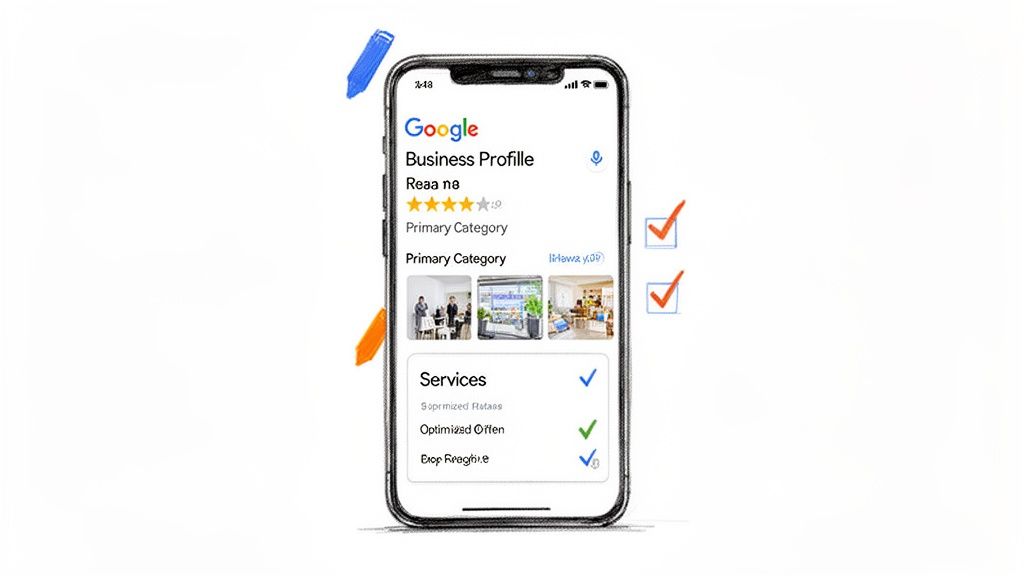
Let's be clear: your Google Business Profile (GBP) is the absolute heart of your Google Maps strategy. It’s not just a listing; it’s your interactive storefront on the world’s biggest local search engine. Google is constantly scanning it to figure out how relevant and prominent you are.
Getting the basics right—like your name and address—is just the starting line. A truly optimized profile is an engine for attracting new customers, plain and simple.
Think of your GBP as the central nervous system for your local presence. Every photo you upload, every service you detail, every attribute you select sends a signal to Google about who you are and who you should be shown to. A profile that’s packed with useful info and updated regularly tells the algorithm you’re an active, trustworthy business that deserves to be at the top.
Nail Your Business Categories
This is one of the most critical moves you can make. The categories you choose directly control which searches you can even show up for. Your primary category is the most powerful, so make sure it perfectly captures the main thing you do.
For example, I once saw a cafe that also roasted its own beans list "Coffee Roasters" as their primary category. Big mistake. They should have chosen "Coffee Shop," because that's what customers are actually searching for when they want to sit down and buy a latte.
From there, you can layer in secondary categories to cover your other offerings. That same coffee shop could add:
- Espresso Bar
- Cafe
- Restaurant
- Sandwich Shop
Just don't go crazy. Only add categories that are a genuine fit. Piling on irrelevant ones will dilute your relevance for the terms that actually matter and end up confusing Google and your customers.
Write a Business Description That Works
Your business description is prime real estate. You get 750 characters to tell people what you're about while weaving in important local keywords. This isn't the spot for corporate fluff; it's your chance to clearly state what you do, where you do it, and what makes you the best choice.
Instead of a generic line like, "We are the best local cafe," try something with more substance:
"Your friendly neighborhood coffee shop in Downtown Austin, serving artisanal espresso drinks, locally sourced pastries, and gourmet sandwiches. We specialize in single-origin pour-overs and provide a cozy atmosphere with free Wi-Fi for remote workers and students."
See the difference? This version naturally folds in keywords like "coffee shop," "Downtown Austin," "artisanal espresso," and "gourmet sandwiches," directly connecting your profile to what people are actually typing into the search bar. We go even deeper on this in our guide on how to optimize your Google Business Profile.
Fill Out Every Single Feature
A complete profile is a trusted profile. It’s that simple. Google rewards businesses that take the time to use all the features it offers because it creates a better, more informative experience for searchers.
Products and Services: Don’t just list your services—flesh them out. For every service, add a detailed description and, if it makes sense, a price. If you run a wellness clinic, don't just put "Massage Therapy." Create separate entries for "Deep Tissue Massage," "Swedish Massage," and "Hot Stone Massage," and explain the benefits of each.
Attributes: These are quick-hit details that answer customer questions before they even ask. Think "Wheelchair accessible entrance," "Free Wi-Fi," "Outdoor seating," or "Identifies as women-owned." An updated study shows businesses with photos get 42% more requests for directions and 35% more website clicks—attributes work the same way by giving users the instant info they need.
Photos and Videos: Visuals are non-negotiable. Upload high-quality, real photos of your storefront, your team in action, your products, and your interior. Adding new photos regularly is a powerful signal to Google that you're an active business. I always recommend a mix of professional shots and more candid, in-the-moment pictures that show off your brand’s personality.
By meticulously filling out every section, you build a profile that doesn't just check boxes for the algorithm—it actually turns searchers into paying customers.
Building Authority with Local Content and Citations
Your Google Business Profile is the heart of your local presence, but to really own the Map Pack, you need to build authority well beyond your own listing. Think of it this way: your GBP is what you say about your business. Off-page signals like local content and citations are what the rest of the internet says about you.
And Google trusts the crowd way more than it trusts you alone.
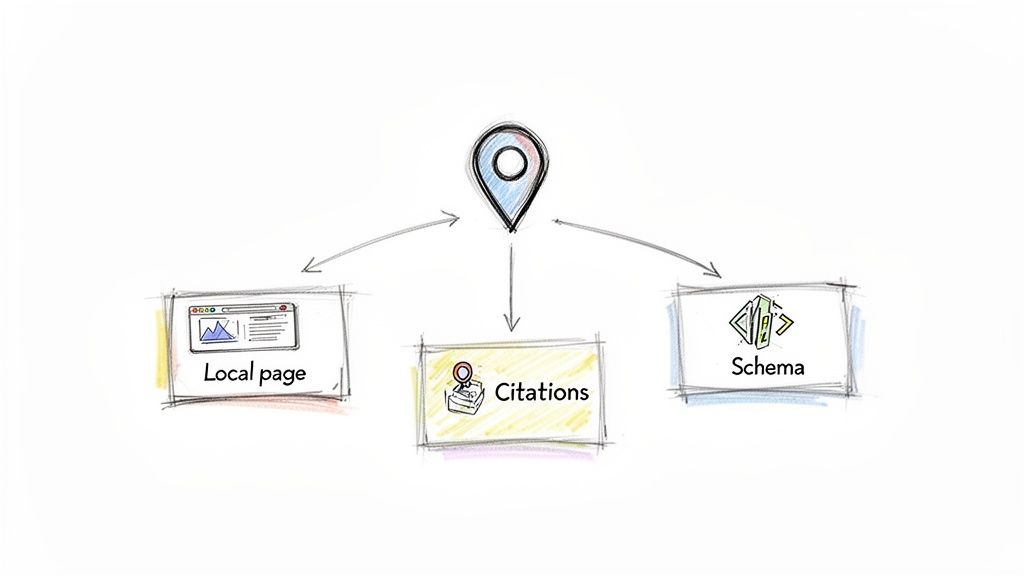
True authority in Google Maps SEO comes from creating a consistent, powerful digital footprint that constantly reinforces your legitimacy and relevance to a specific area. This really boils down to two key plays: creating hyper-local content on your own website and obsessively managing your business citations across the web.
Create Hyper-Local Landing Pages
For any business, but especially multi-location brands, dedicated landing pages for each storefront are completely non-negotiable. These pages are powerful geographic anchors, screaming to Google, "Hey, we are a real, active business right here at this specific address."
A generic "Contact Us" page just doesn't send the same signal. Each location page needs to be a unique resource, woven into the fabric of its neighborhood.
- Embed a Google Map: Don't just list the address—embed the actual Google Map for that specific location. It creates a direct, tangible link between your website and your GBP.
- Use Local Keywords: Weave in the names of the city, neighborhood, and even nearby landmarks naturally. A wellness clinic in Brooklyn might mention being "just a short walk from Prospect Park" or proudly serving the "Park Slope community."
- Include Unique Content: Add photos of the storefront and the team. Detail store-specific hours and introduce the local manager by name. Mentioning local events you sponsor or partnerships with other neighborhood businesses deepens that geographic connection even further.
The whole point of a location page is to leave zero doubt in Google's mind that you're an integral part of that community. It’s the digital proof that you belong there, and it directly supports your prominence in the Map Pack.
Add Local Business Schema Markup
Schema markup is basically a secret language for search engines. It's code you add to your website that helps Google understand your content perfectly. For local businesses, the "LocalBusiness" schema is a total game-changer.
This code explicitly tells Google critical information in a format it loves:
- Your exact business name, address, and phone number (NAP).
- Your hours of operation.
- Your geographic coordinates (latitude and longitude).
- Links to your social media profiles.
By adding this structured data to your local landing pages, you're essentially spoon-feeding Google the exact info it needs to validate your location. It makes your listing a far more authoritative and trustworthy result in their eyes.
Master Your Local Citations
A citation is any online mention of your business's Name, Address, and Phone number (NAP). These pop up on local business directories, industry-specific sites, and social media. Think of each consistent citation as another vote of confidence for your business.
But inconsistency is the absolute enemy of local SEO. An old address on Yelp, a typo in your business name on Yellow Pages, or a wrong phone number on a niche directory creates confusion for Google's algorithm. That confusion erodes trust and can actively tank your rankings.
Your first move should be a thorough citation audit. Use a tool to hunt down every mention of your business online and pinpoint any NAP data that doesn't match. Fixing these errors is a foundational task that cleans up your digital footprint.
Once your existing listings are clean, you can focus on building new, high-quality citations. Prioritize directories that are actually relevant to your industry and location. A listing on your local Chamber of Commerce website, for instance, carries a lot more weight than a generic, low-authority directory. You can learn more about local citations and how they impact your SEO in our detailed guide.
https://nearfront.com/what-are-local-citations/
By combining hyper-local on-page content with a clean, consistent citation profile, you build a powerful web of authority around your business. This tells Google you aren't just on the map—you're a pillar of the local community it serves.
Generating Reviews and Authentic Engagement Signals
Old-school local SEO was a monologue—you optimized your profile, built some citations, and hoped for the best. Modern local SEO is a conversation. Google ultimately rewards businesses that prove they're actively engaged with their customers in the real world.
This is where reviews and behavioral signals become your most powerful assets. They are the live, unscripted proof that your business is relevant, popular, and trustworthy. Nail this, and you create a positive feedback loop that pushes your profile higher in the Map Pack for the searches that actually make you money.

Cultivating a Powerful Review Profile
Let's get straight to it: reviews are the heart of your local SEO strategy. They influence an estimated 20% of your ranking potential and provide the social proof that convinces both Google and real customers to pick you over the guy down the street.
But it’s not just about collecting five-star ratings. It’s about building a rich, active, and trustworthy review profile.
While a high volume of reviews signals popularity, "review velocity"—how often you get new reviews—is just as critical. A business getting five new reviews every month looks far more current and relevant than one with 100 reviews that are all two years old. Freshness matters.
How to Encourage High-Quality Reviews
If you want more reviews, you have to make it dead simple for customers. The more friction, the less likely they are to follow through.
Here’s how to do it right:
- Make the Ask Easy: Use QR codes on receipts or at your front desk that link directly to your Google review page. Send a follow-up email or text after a purchase with that same direct link. No searching, no hassle.
- Time it Right: The magic moment to ask is right after a positive experience, when their satisfaction is at its peak.
- Guide Their Feedback: You can't script their review, but you can prompt them. A simple suggestion like, "We’d love to hear about your experience with our deep tissue massage today!" naturally encourages them to use valuable keywords.
Responding to every single review—good, bad, or indifferent—is non-negotiable. It shows prospective customers you actually care, and it signals to Google that you’re an actively managed business.
A professional and empathetic response to a negative review can be more powerful than a dozen five-star ratings. It shows you're accountable and can turn a poor experience into a public display of incredible customer service.
Driving Authentic Engagement Signals
Beyond reviews, Google is watching how users interact with your profile. These behavioral signals are the digital equivalent of foot traffic, and they are direct proof that people find your listing useful. They make up a huge part of your "prominence" score in Google’s algorithm.
The goal isn't to game the system. It's to create a profile so compelling that these actions happen naturally. A profile packed with high-quality photos, detailed service descriptions, and fresh Google Posts practically begs users to dig deeper.
The Most Valuable User Actions
Each of these signals tells Google your business is a popular and relevant answer to what someone is looking for right now.
- Clicks to Call: A direct line to a lead. This is one of the highest-intent actions a user can take, signaling an immediate need for your service.
- Direction Requests: This is a crystal-clear indicator that someone plans on walking through your door. It’s a powerful signal of real-world interest.
- Website Clicks: These users are looking for more details—maybe a full menu, service pricing, or an online booking portal.
- Photo Views: High engagement with your photos shows that people find your business visually appealing and want to get a real feel for what you offer.
The table below breaks down these signals and gives you some simple tactics to start generating them authentically.
High-Impact Engagement Signals for Google Maps
This table breaks down the key behavioral signals Google tracks and provides actionable tactics to generate each one authentically.
| Engagement Signal | Why It Matters to Google | How to Generate It |
|---|---|---|
| Clicks to Call | Signals immediate, high-intent interest in your services. | Make sure your phone number is accurate and prominent. Use Google Posts to promote special offers that encourage a call. |
| Direction Requests | Strongest indicator of a planned physical visit. | Upload enticing photos of your storefront and interior. Run geo-targeted ads to users in nearby areas. |
| Website Clicks | Shows users are seeking more in-depth information. | Link to specific, relevant pages (like your menu or booking page) directly from Google Products and Posts. |
By focusing on a great customer experience that naturally leads to glowing reviews and genuine interactions, you create a powerful cycle. More engagement leads to higher rankings, which drives even more visibility and engagement, cementing your spot at the top of the local market.
How to Measure Your Google Maps SEO Performance
If you can’t measure your strategy, you’re just guessing. Effective Google Maps SEO isn't about making a bunch of changes and hoping for the best; it's about connecting your optimizations to real business outcomes, like more calls and more foot traffic.
This is where you prove the ROI of your efforts, especially when you're managing multiple locations. You have to move past simply checking your rank and start focusing on the key performance indicators (KPIs) that signal genuine customer engagement. These are the metrics that show people aren't just seeing your business—they're actively choosing it.
Tracking the KPIs That Actually Matter
Your starting point is the native Google Business Profile Insights dashboard. It has its limits, sure, but it gives you a solid baseline for the most important user actions. The trick is to avoid getting bogged down in vanity metrics and zero in on the data that directly leads to new customers.
Your core focus should be tracking these actions over time:
- Views on Maps vs. Search: This tells you where your audience finds you. A high number of views directly on Maps usually means strong local intent from people who are ready to show up at your door.
- Direction Requests: This is one of the purest indicators of foot traffic. An increase here is a crystal-clear sign that your work is driving real people to your physical storefront.
- Click-to-Call Rates: Phone calls are high-value leads, plain and simple. Tracking how many calls come from your GBP shows exactly how well your profile is converting searchers into immediate prospects.
- Website Visits: Clicks to your website often come from users who need a little more info before they commit, like browsing a full menu or checking out a list of services.
Track these metrics month-over-month to spot trends. Did that batch of new photos lead to a spike in direction requests? Did that Google Post about a promotion boost website clicks? This data-driven approach is what turns your strategy from reactive to proactive.
Visualizing Your Local Visibility
The standard GBP Insights won't show you how your visibility changes from one neighborhood to the next. For any brand with more than one location, this granular view is absolutely essential for finding underperforming stores and knowing exactly where to focus your energy. This is where you need a more specialized tool.
A sophisticated Google Maps ranking checker helps you visualize your search visibility with heatmaps, showing precisely where you rank for your target keywords across an entire city. This helps you understand which search terms are driving the most valuable actions and where competitors are eating your lunch.
By analyzing this data, you can sharpen your strategy, prioritize the highest-impact tasks, and clearly show stakeholders how your Google Maps SEO efforts are paying off.
Common Questions About Google Maps SEO
When you're deep in the weeds of local search, a few key questions always seem to pop up. Let's clear the air so you can focus on what actually moves the needle for your Google Maps ranking.
How Long Does This Actually Take?
Look, if you're just updating your business hours, you'll see that change almost instantly. But for real, meaningful ranking improvements? You're playing the long game.
Expect to see a real shift in your visibility within three to six months. It's not an overnight fix. Things like how competitive your market is, how consistently you’re pulling in new reviews, and the authority of your website all factor in. Local SEO is all about building momentum—the work you do today pays dividends down the road.
What’s the Biggest Mistake I Can Make?
Easy. The "set it and forget it" approach. Treating your Google Business Profile like a static business card is the fastest way to get ignored by Google. It's a living, breathing profile, and it needs attention.
When you neglect to add fresh photos, publish Google Posts, reply to reviews, and answer questions, you're signaling to Google that you're less active than your competitors. An engaged profile gets rewarded. Simple as that.
Do I Absolutely Need a Physical Address to Rank?
For the traditional Map Pack results that everyone wants? Yes, a verifiable physical address is non-negotiable. Service-area businesses can hide their address, but they play by a different set of rules based on the zones they serve.
If you run a brick-and-mortar shop—like a retailer, clinic, or dispensary—a real storefront that customers can walk into is a foundational requirement. It's the price of admission for top visibility in local map searches.
Ready to turn your Google Maps visibility into actual foot traffic? Nearfront uses AI to show you exactly where you stand and generates the authentic engagement signals you need to climb the ranks. Discover how Nearfront can grow your local presence today.