If you're still using a traditional SEO rank tracker for your local business, you’re looking at a dangerously incomplete picture.
Seriously. It might tell you you're ranking nationally for a key term, but it completely misses the hyperlocal reality where 97% of people learn more about a local company online than anywhere else. This gap means you could be invisible to a potential customer standing just a few blocks away from your front door.
Why Traditional SEO Fails at Local Search
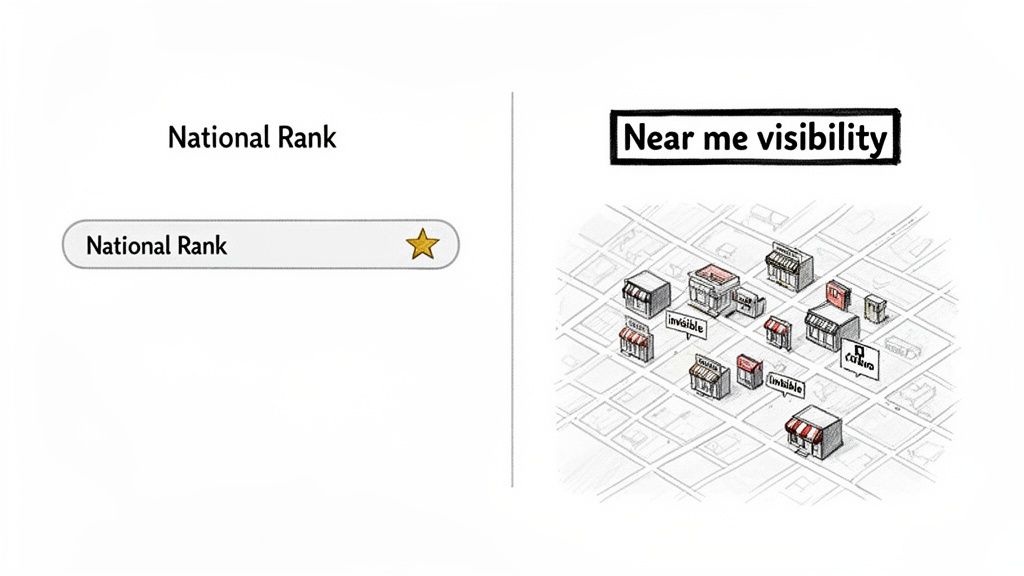
The fundamental flaw with old-school rank tracking is its one-size-fits-all approach. It checks your ranking from a single, generic server location, spitting out a national or regional average. For a brick-and-mortar business, that metric is almost useless. Your success hinges on attracting customers within a very specific service area, not impressing a server farm a thousand miles away.
This problem gets way worse for multi-location brands. A national report might show your brand ranks #5 for "wellness clinic," but that data is hiding a critical failure. It doesn't tell you that your downtown branch is invisible to users in a key suburb, while a competitor is absolutely dominating that exact neighborhood.
The Hyperlocal Reality of 'Near Me' Searches
Modern customers don't just search for "best pizza." They search for "best pizza near me." That simple phrase changes everything.
For these queries, Google’s algorithm slams the brakes on old rules and prioritizes two things above all else: proximity and local prominence. This means your rankings can shift dramatically from one street to the next.
Let’s look at a real-world example. Imagine a retail chain with two stores in the same city.
- Store A (Downtown): Ranks #2 for "running shoes" for anyone searching within a one-mile radius.
- Store B (Uptown): Doesn't even crack the top 20 for the same search term for users just three miles away.
A traditional tracker would average these out, masking the fact that Store B is a ghost. A proper google maps rank tracker is different. It simulates searches from dozens of specific points around each location, revealing these "ranking deserts" where you have zero visibility.
The whole point of local SEO isn't just to rank—it's to rank where it actually counts. Visibility is only valuable if it's in front of a potential customer who can physically walk through your door.
From Rankings to Real-World Actions
At the end of the day, local SEO isn't about a number on a chart. It’s about driving tangible business outcomes like phone calls, direction requests, and actual foot traffic. Google Maps is the pipeline for these actions.
When a customer finds you in the Map Pack, they are one click away from calling your store or getting directions.
If you aren't showing up in the top three Map Pack results for a potential customer's location, you effectively don't exist for that search. This is why you have to get granular. To really dig in, you can explore the key local SEO ranking factors that Google’s algorithm weighs.
Without a tool built to measure this hyperlocal performance, you're flying blind, unable to connect your SEO efforts to actual revenue.
Setting Up Your Tracker for Hyperlocal Insights
Now that we know why hyperlocal visibility is non-negotiable, let’s get our hands dirty. Firing up a Google Maps rank tracker isn't just about plugging in your business name and hitting "go." To get data that actually drives foot traffic and phone calls, you have to be strategic from the very first click.
The whole process boils down to three critical pieces: picking the right keywords, setting up your tracking grid, and zeroing in on your true local competitors. To keep this grounded, we'll use a multi-location wellness brand with clinics across several cities as our running example.
Choosing Keywords That Drive Local Action
Your keyword strategy for Google Maps is a completely different beast than traditional SEO. You’re not chasing broad, high-volume terms. You're targeting high-intent phrases that scream a customer is ready to act right now.
You have to think like your customer. Someone searching "massage therapy" is just browsing. But someone searching "deep tissue massage near downtown" is looking to book an appointment. Your entire goal is to capture that second person.
A good keyword list is a balanced one. For our wellness clinic, we’d want a mix of a few key types:
- Core Service Keywords: These are the bread and butter of what you do. For the clinic, that means "physical therapy," "chiropractor," and "sports massage."
- High-Intent Keywords: These almost always have qualifiers signaling urgency or a specific need, like "emergency chiropractor appointment" or "same-day sports massage."
- Branded Keywords: You should rank #1 for your own name, but tracking it is a must. A sudden dip in your branded search ranking can be an early warning sign of a big problem, like a new competitor with a similar name sowing confusion.
Don't get lost chasing dozens of long-tail keywords. Start with 3-5 core service terms for each location. You can always add more later, but a focused approach keeps you from drowning in noisy, unhelpful data.
Defining Your Geo-Grid for Accurate Tracking
This is where a dedicated Google Maps rank tracker really earns its keep. A geo-grid simulates searches from multiple points around your physical address, creating a "heatmap" of your visibility. And getting the setup right is everything.
For our wellness clinic's downtown location, a tight 3×3 grid (9 total points) spread over a 1-mile radius is probably perfect for a dense urban core. But for their suburban clinic near a major highway? We’d want a much larger 7×7 grid (49 points) covering a 5-mile radius to see how their visibility holds up for commuters and people in surrounding neighborhoods.
The key is to tailor the grid to the unique geography of each specific location. A one-size-fits-all approach will hand you misleading results every time.
Identifying and Tracking True Local Competitors
Finally, you need to know who you're really up against. Your biggest national competitor might be a ghost on the local level. The real threat is often the independent clinic two blocks away that has an iron grip on the neighborhood.
A good tracker will suggest competitors based on who’s already ranking for your keywords in the grid you just set up. For each of your locations, you should be tracking 3-5 direct local competitors.
To pull it all together, let's look at how different keyword types can inform your strategy.
Choosing Keywords That Drive Local Action
This table breaks down the keyword types you need for a balanced and effective tracking strategy, showing what each one reveals about your local performance.
| Keyword Category | What It Reveals | Example for a Wellness Clinic |
|---|---|---|
| Core Service Terms | Your foundational visibility for what you primarily offer. | "chiropractor downtown" |
| High-Intent Phrases | How well you capture customers with an immediate need. | "walk-in sports massage" |
| Problem-Based Queries | Your visibility for searches related to specific symptoms. | "sciatica pain relief near me" |
| Branded Search | Your brand's local authority and market presence. | "Synergy Wellness clinic" |
Once these pieces are in place, the rank tracker can start pulling in data. The goal isn't just to see where you rank, but to understand why. A well-configured setup connects your rankings directly to your physical locations and the competitors fighting for the same local customers.
This initial setup is the foundation for everything else. It ensures the heatmaps, reports, and insights you get are accurate and, most importantly, actionable. If you want to dive deeper into optimizing your storefront's digital presence, our Google Business Profile optimization checklist offers a step-by-step guide to making sure your listing is primed for success.
How to Actually Read Ranking Heatmaps
At first glance, a heatmap from a Google Maps rank tracker can look like a piece of modern art—just a grid of colors and numbers. But once you know how to read it, it becomes one of the most powerful tools in your local SEO toolbox. It’s your block-by-block report card on hyperlocal visibility.
Think of it like this: every single point on that grid is a potential customer searching for you from that exact spot. The number inside the dot? That’s your Google Maps ranking if they searched from that location.
The colors are just there to make it all digestible in a few seconds. Green shades usually mean you’re in the coveted Map Pack (top 3). Yellow means you’re on the first page but outside the top 3 (positions 4-10). And red? That means you’re buried on page two or beyond, basically invisible.
This visual data doesn't just appear out of nowhere. It's the result of a deliberate setup process.
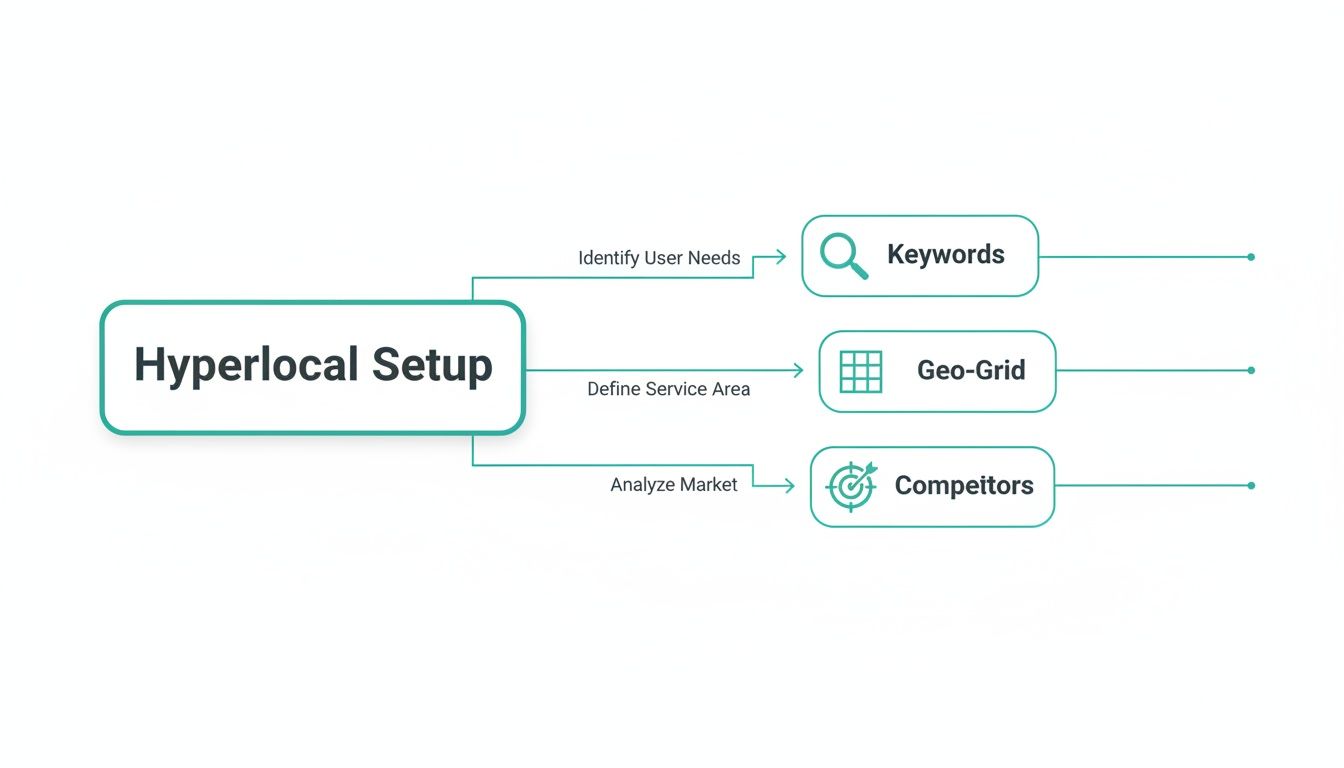
As you can see, everything starts with picking the right keywords, defining a precise geo-grid, and knowing who you're up against. Get those foundational steps right, and your heatmap will be both accurate and actionable.
Identifying Ranking Patterns and Outliers
Once you've got the basics down, the real magic is in spotting the patterns. Don't get lost looking at individual dots; zoom out and look at the whole map. Do you see clusters of green right around your physical address? Good, that’s what you’d expect—Google’s algorithm loves proximity.
But the most valuable insights often come from the outliers. See that random green spot five miles away? That's weird, and it's worth digging into. It could be a signal from a powerful backlink from a local blog in that neighborhood or maybe a bunch of great reviews from customers who live there.
More often, though, you’ll find what I call "ranking deserts"—big patches of red where you have zero visibility. These are your blind spots, full of potential customers who will never find you with a "near me" search. A heatmap makes these problem areas impossible to ignore.
Your goal isn't to turn the entire map green. That's unrealistic. The goal is to strategically turn red zones into yellow, and yellow zones into green, focusing on the neighborhoods that actually matter to your business.
Diagnosing Performance Gaps Between Locations
For any multi-location brand, comparing heatmaps side-by-side is a game-changer. Let's go back to our wellness clinic example. Imagine their downtown clinic has a solid green core spreading for several blocks, but the suburban branch is a sea of red just a half-mile from its front door.
This immediately tells a story. The downtown spot is probably benefiting from high business density, more foot traffic, and greater "prominence" in Google's eyes. The suburban location, on the other hand, is getting beat by competitors who have stronger local signals in the surrounding neighborhoods.
Common reasons for these gaps include:
- Competitor Density: A competitor might just own the suburban market, with tons of reviews from that specific area.
- Inconsistent NAP: Maybe the suburban location has sloppy Name, Address, and Phone number info across online directories, which tanks Google's trust.
- Weak Website Landing Page: The landing page for the suburban clinic might not be optimized with local keywords or content that speaks to that community.
This visual data gives you a clear starting line for your investigation. No more guessing why one location is struggling—you have a map pointing you right to the problem.
Turning Heatmap Insights into Action
Reading a heatmap is one thing, but acting on it is what gets results. Your analysis should always end with a clear, prioritized to-do list.
If you spot a "ranking desert" in a high-value neighborhood, your next move could be to launch a location-specific Google Ad campaign targeting that zip code. Or maybe you sponsor a local community event there to start building some local links.
If one of your locations is crushing it, figure out why. Dig into its Google Business Profile. Does it have more photos? More reviews? More Q&A engagement? Clone that success and apply it to your underperforming stores.
For those ready to generate these crucial reports, a Google Maps ranking checker is the tool that gets you started.
Ultimately, a heatmap is more than just a ranking report. It’s a strategic guide that shows you where you’re winning, where you’re losing, and exactly where to focus your energy for the biggest impact on foot traffic and revenue.
Tying Local Rankings to Business Growth
A green heatmap is a beautiful thing, but let's be honest—it's a vanity metric if it doesn't lead to real-world results. The whole point of local SEO isn't just to see your business light up a map; it's to drive the customer actions that actually grow your bottom line. This is where we connect the dots between visibility and revenue.
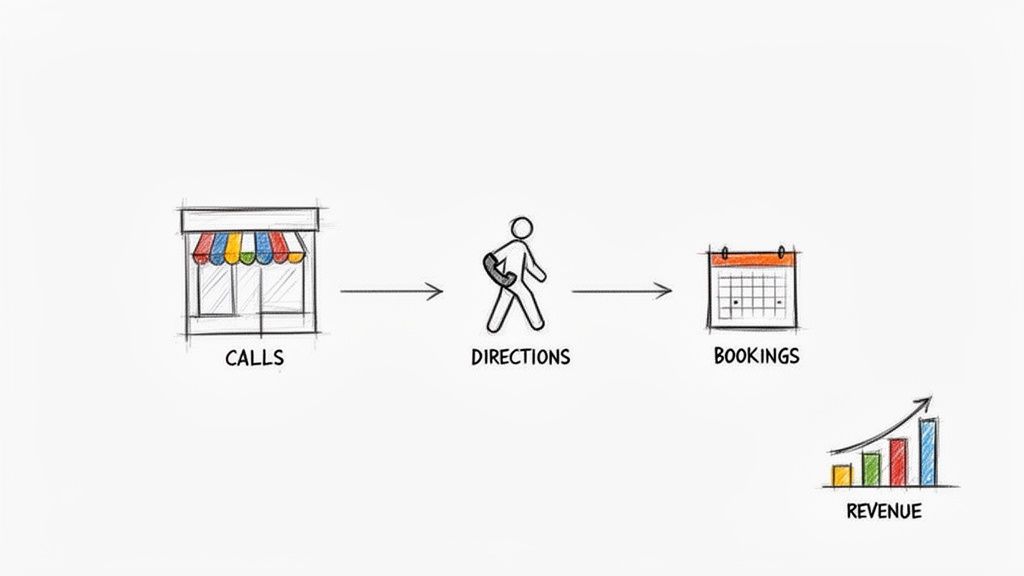
Top rankings are the starting point, not the finish line. The true measure of success is quantifying how those rankings impact what really matters: phone calls, direction requests, and website clicks that turn into appointments. A solid google maps rank tracker gives you the visibility data, but the real magic happens when you tie that data back to business outcomes.
And here’s the good news: you don't need full Google Business Profile access for every single location to prove this. By tracking your hyperlocal rankings over time, you can directly link visibility improvements to spikes in leads and foot traffic, building a rock-solid business case for your SEO efforts.
Moving Beyond Rankings to Measure Real Actions
The beauty of Google Maps is that it's built for action. When a user finds you in the Map Pack, they’re usually at the end of their customer journey. They aren't just browsing—they're looking to solve a problem right now.
These actions are the bridge between your online presence and offline revenue. They are the tangible proof that your local SEO strategy is actually working.
We need to obsessively track the lift in these key performance indicators (KPIs) as your rankings climb:
- Phone Calls: The most direct lead you can get from local search, often from customers with a high intent to buy.
- Direction Requests: A crystal-clear signal that someone is planning to visit you in person, directly connecting online visibility to foot traffic.
- Website Clicks: These are your money-makers, often leading to online bookings, service inquiries, or deeper engagement that converts.
When you track these metrics alongside your ranking data, you stop talking about positions and start talking about profit.
A Real-World Scenario: Connecting Rankings to Revenue
Let’s walk through a practical example. Imagine a dental clinic uses a Google Maps rank tracker and finds they have terrible visibility for "emergency dentist" in a key neighborhood just two miles from their office. They consistently sit at rank #8 in that area, meaning they're invisible to potential patients in pain.
They launch a targeted campaign to fix this, focusing on getting positive reviews from patients in that specific zip code and optimizing their "emergency services" page with location-specific content.
Here's the critical part: you must benchmark your business metrics before starting. Know your average weekly phone calls, direction requests, and online bookings for that location. This baseline is how you'll measure your win.
Two months later, the rank tracker shows their position for "emergency dentist" has jumped from #8 to #2 in that target neighborhood. Now, they can check their business data. They discover inbound calls about toothaches are up 30%, and online bookings for same-day appointments have shot up 25%.
This creates a powerful, undeniable story. The investment in local SEO directly caused a measurable increase in high-value patient appointments. This isn't just about rankings; it's about proving a clear return on investment for every location in your portfolio. This is how you prove your value.
Using Data to Decide Your Next SEO Move
All the heatmaps, reports, and hyperlocal data in the world are just noise until you use them to make smarter decisions. This is where the real work begins—translating those colorful grids from your google maps rank tracker into a focused action plan that actually drives growth.
The goal isn't just to pile up data; it's to find the story inside it. A good report doesn't just show you a bunch of numbers. It highlights trends, shows you how you’re performing city by city, and pinpoints which keywords are pulling their weight. That clarity is what lets you move from just fixing problems to proactively building a local SEO strategy that wins.
Prioritizing Your Efforts for Maximum Impact
So, where do you start? This is the classic dilemma. Do you push a location that’s hovering at position #4 into the top 3 Map Pack? Or do you try to rescue a store languishing way down at #15?
The data has the answer, and it usually points to the quick win.
Boosting a store from #4 to #2 can trigger an immediate and significant jump in calls and direction requests. That’s because you’re moving from being just another option to being one of the first options a customer sees. Trying to drag a location from #15 to #10 is a noble effort, but it often requires a ton more work for a much smaller return.
Look at your data through this lens:
- Low-Hanging Fruit: Find locations ranking between 4-7 for your most valuable keywords. These are your prime targets.
- Defensive Plays: Identify locations that are already in the top 3 but have a new competitor creeping up the ranks. Protect those spots.
- Long-Term Projects: Those locations ranking 15+ aren't a lost cause, but they often need foundational work like a full citation cleanup or a major review generation push. Budget your time for these accordingly.
Doubling Down on What Actually Works
Let's be honest: not all keywords are created equal. One term might give you high visibility but very few clicks, while another drives a flood of profitable actions. Your rank tracker's reports, especially when you cross-reference them with your own business metrics, will show you which keywords truly make you money.
For example, you might find that "emergency appointments near me" has a lower search volume but leads to 5x more phone calls than a broad term like "wellness clinic." That’s your signal to double down.
Don't waste energy trying to be #1 for everything. The real strategy is to identify the 20% of keywords that are driving 80% of your valuable customer actions and ensure you dominate the map for those specific terms.
Once you know what’s working, you can get surgical with your resources. This could mean creating dedicated landing pages for those high-value keywords or running hyper-targeted local ad campaigns. It’s all about precision, not just being busy.
Leveraging Automated Reports to Stay Ahead
The insights from a good rank tracker become truly powerful when you automate them. Getting a regular report—weekly or bi-weekly—allows you to spot trends before they turn into problems. You can see exactly how you stack up against competitors over time and measure the direct impact of your SEO changes.
These automated snapshots also make it dead simple to demonstrate progress. Instead of just saying, "we're working on it," you can show clear before-and-after heatmaps that prove your strategy is paying off. This is how you build trust and justify continued investment in local SEO.
This focus is critical, especially when you consider that 88% of people rely on Google Maps to find local businesses. With 42% of those users clicking directly on the Map Pack, securing those top spots is non-negotiable. You can dive into more compelling data about local search behavior on seoprofy.com.
Common Questions We Hear About Google Maps Rank Tracking
Even with a solid plan, jumping into hyperlocal SEO can bring up some tricky situations. Let’s walk through a few of the most common questions that come up when businesses start using a google maps rank tracker. My goal is to give you straightforward answers so you can move forward with confidence.
How Often Should I Check My Google Maps Rankings?
This is a classic. And the answer is definitely not "every day." For most businesses with multiple locations, obsessively checking daily rankings is just a recipe for anxiety. Local search results are notoriously volatile, and those tiny daily fluctuations will drive you crazy without telling you anything meaningful.
A much smarter rhythm is bi-weekly or monthly tracking. This is frequent enough to spot big shifts—like a new competitor muscling into the Map Pack—but it filters out all the daily noise. It gives you enough breathing room to actually see the impact of your work, whether that's a new review campaign or a citation cleanup project, which often take a few weeks to move the needle.
Don't mistake constant monitoring for a smart strategy. The whole point of a Google Maps rank tracker is to guide long-term decisions, not to have you react to every little dip and spike. Focus on the trend line, not the daily blips.
Why Do My Rankings Look Different Than What a Customer Sees?
This one causes a ton of confusion, but it gets right to the heart of why hyperlocal tracking is so critical. If you search for your own business while you're standing inside one of your locations, you're almost guaranteed to see yourself at #1. Google knows your exact location and heavily favors proximity.
But a potential customer searching from just a few blocks away? They'll see a completely different set of results. Their distance from your competitors, their own search history, and a dozen other signals will change what Google shows them. A google maps rank tracker fixes this by simulating searches from a grid of neutral, predefined points. It gives you an unbiased view of how you look across an entire service area, completely removing your own phone's search bias from the picture.
Can I Actually Improve Rankings in a Specific Neighborhood?
Absolutely. This is probably one of the most powerful ways to use heatmap data. Once your tracker shows you a "ranking desert"—a valuable neighborhood where you’re basically invisible—you can launch a surgical SEO campaign to fix it.
Here are a few tactics that have worked time and time again:
- Location-Specific Content: Build a page on your website that’s all about that neighborhood. Talk about local landmarks, cross streets, and community events to send strong relevance signals to Google.
- Targeted Review Generation: When you have a happy customer you know lives in that area, make a point to ask them for a Google review. Reviews that naturally mention the neighborhood or city are local SEO gold.
- Local Link Building: Sponsor a local little league team, team up with a non-competing business in the area for a promotion, or get a feature in a neighborhood blog. These kinds of hyperlocal backlinks tell Google you're a real part of that specific community.
These targeted efforts blow generic, city-wide campaigns out of the water. They prove to Google that your business isn't just in a city, but a true part of each neighborhood it serves.
Ready to stop guessing and start seeing exactly where you stand? Nearfront provides the AI-powered heatmaps and hyperlocal insights you need to dominate local search, increase calls, and drive more foot traffic to every one of your locations. See how it works at https://nearfront.com.