If you want to show up on Google Maps, it all starts with one thing: a free Google Business Profile (GBP). This is your command center. It’s what feeds all your critical business information—your address, hours, photos, services—directly into Google Maps and those all-important local search results.
Your Starting Point for Google Maps Visibility
Think of your Google Business Profile as the digital front door for anyone searching nearby. It’s so much more than just a pin on a map. It’s a living, breathing listing that convinces people to call you, click for directions, or walk right in.
When a potential customer searches "coffee shop near me" or "plumber in Austin," Google isn't just looking at websites. It's scanning its massive index of Business Profiles to deliver the most relevant, complete, and trustworthy options. If you don't have a profile, you're invisible. It’s that simple.
This guide isn't about the basic setup you've read a hundred times. We’re going to turn your profile into a machine that brings customers to your door. From creation and verification to the advanced tactics that leave competitors wondering what you're doing, we'll cover it all. The goal is to build a profile so rich and compelling that Google has no choice but to show it to your ideal customers.
Why a Complete Profile Is Non-Negotiable
Just having a profile isn't enough to move the needle. You have to actually use it. The data is crystal clear: completeness and verification are directly tied to how often you show up. An empty, unclaimed profile sends weak signals to Google, which is the fastest way to get buried in the search results.
And the missed opportunity is staggering. New research shows that over 11.1% of Google Business Profiles in the U.S. are still unclaimed, leaving a huge chunk of business owners with zero control over their online presence. On the flip side, fully completed and verified profiles are shown up to 80% more often in local searches. That's a massive advantage. You can dig into the latest Google Business Profile statistics to see the full picture.
It all boils down to this: If you don't take control of your Google Business Profile, you're literally handing customers to the competitors who do. It's the absolute foundation of any local marketing that works.
Core Components of a Winning Google Business Profile
To get started on the right foot, let's look at the core pieces of your profile you need to nail down. Each one gives Google another reason to trust your business and show it to more people.
This table breaks down the essentials—what they are, why they matter, and what you need to do right now.
| Component | Why It Matters for Google Maps | Action Item |
|---|---|---|
| Business Name & Category | Tells Google the core of what you do, directly impacting search relevance. | Use your official business name and select the most accurate primary category. |
| Address & Service Area | Defines your physical location or the regions you serve. | Ensure your pin is correctly placed or your service areas are accurately defined. |
| Hours & Contact Info | Provides essential information for customers to take action. | Keep your hours updated, especially for holidays, and ensure your phone number is correct. |
| Photos & Videos | Offer a visual preview, building trust and engagement. | Upload high-quality, recent photos of your storefront, products, and team. |
| Reviews & Q&A | Build social proof and provide answers to common customer questions. | Actively encourage reviews and respond to all feedback promptly. |
Think of these components as the building blocks of your visibility. Get them right, and you're already ahead of the game.
Alright, let's get your business on the map—literally. Creating your Google Business Profile is your first real move in the fight for local visibility, and the choices you make right now will have a huge impact down the road.
First things first, head over to google.com/business and sign in with the Google account you plan to use for managing your business. You'll be asked for your business name. This is critical: use your real, official business name. Don't try to stuff keywords or city names in there. That's a classic mistake that violates Google's guidelines and is a fast track to getting your profile suspended.
Nailing Your Business Category and Type
Once your name is in, you'll hit one of the most important forks in the road: choosing your primary business category. This is how you tell Google exactly what you do and which searches you should show up for. You have to think like a customer here. If you run a coffee shop that's famous for its pour-overs, "Coffee Shop" is good, but "Specialty Coffee Shop" might be even better.
Be as specific as the options allow. Google has thousands of categories, so start typing what you do and find the most accurate fit. This one decision heavily skews which local searches you’ll even be eligible to appear in.
Next, you'll define how customers interact with you. This generally falls into two buckets:
- Physical Storefront: This is for any business customers can walk into—a retail store, a restaurant, a salon. You'll enter your physical address, and Google will drop a pin for you on the map.
- Service-Area Business: This is for businesses that go to their customers. Think plumbers, mobile dog groomers, or cleaning services. You won't show a public address. Instead, you'll define the specific towns, cities, or zip codes you serve.
Getting this right is non-negotiable. Picking the wrong type sends confusing signals to both Google and your potential customers.
The path from creating a profile to actually ranking is a clear, step-by-step process. It's all about getting the foundation right before you can start climbing.
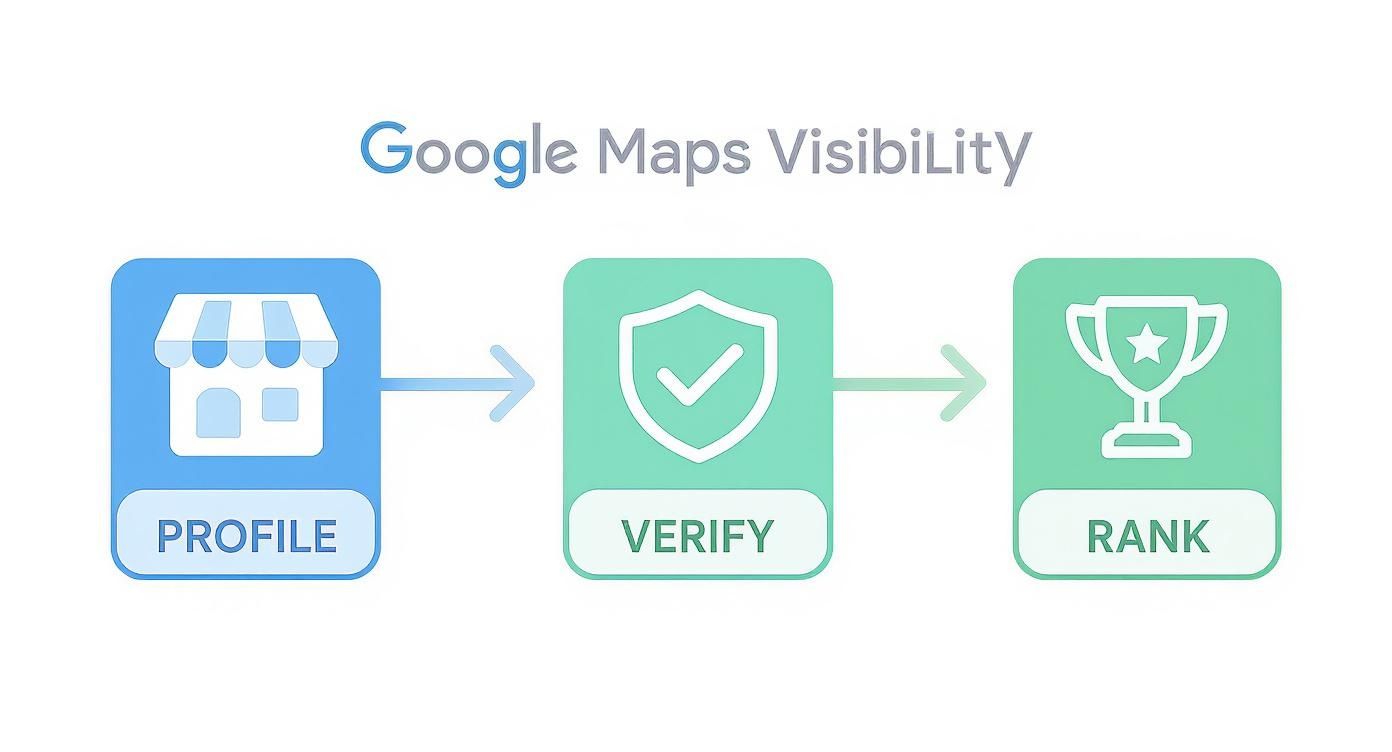
As you can see, verification is the gatekeeper. You can have a perfect profile, but without it, you're invisible to customers on Google Maps.
Navigating the Verification Gauntlet
Verification is simply Google’s way of making sure you are who you say you are, where you say you are. This step trips up a lot of business owners, but it's pretty straightforward once you know what to expect.
The old-school postcard verification is still the most common method. Google will mail a postcard with a secret code to your business address. When it shows up (usually in 5-14 days), you just log back in and pop in the code. Done.
Pro Tip: Whatever you do, don't change your business name, address, or category while you're waiting for that postcard. Any major edits will cancel the request, and you'll be stuck waiting for a new one all over again.
Depending on your business, Google might offer you a faster way out:
- Phone Call or Text: A code is sent directly to your official business phone. It's instant, but not everyone gets this option.
- Email: Same idea, but the code goes to your business email (like
yourname@yourwebsite.com). - Video Verification: This is getting more popular. You'll either do a live video call with a Google rep or record a quick video showing your storefront, business license, and maybe you unlocking the door with your keys. It’s all about proving you’re a real, operational business.
If you're just getting started with this process, our complete guide on setting up a free business listing on Google can be a great companion to these steps.
What to Do If Verification Gets Stuck
Sometimes, things just don't work. The postcard gets lost in the mail, or the instant options never appear. If it’s been over 14 days and you still don't have your postcard, you can log in and request a new one.
If you’re still stuck after a couple of tries, it’s time to contact Google Business Profile support. Before you do, get your paperwork in order. This will speed things up immensely.
Have these ready to go:
- A business license with the correct name and address.
- A utility bill (gas, electric) in the business's name.
- Photos of your permanent sign outside your building.
Dealing with support can be a slow grind, so patience is your best friend here. It might be frustrating, but a verified profile is the ticket you need to even get into the game on Google Maps.
Optimizing Your Profile for Maximum Local Impact
A verified profile is your ticket to the game, but optimization is how you win. Getting your business on Google Maps is one thing; making it stand out is another challenge entirely. This is where you transform a basic listing from a simple pin on a map into a powerful magnet for local customers.
The difference between a top-ranking profile and one that's buried on the second page often comes down to the details. I'm talking about the extra layers of information that give Google—and potential customers—the confidence to choose you over the competition.

Beyond the Primary Category
Your primary category is critical, but don't stop there. Google lets you add multiple secondary categories to give more context about what you actually do. Think of them as supporting keywords that help you show up in more specific, long-tail searches.
For example, a "Restaurant" could add secondary categories like "Outdoor Seating," "Brunch Restaurant," and "Live Music Venue." This simple step widens your net, making you eligible for searches like "restaurants with live music near me." My advice? Add every relevant category you can find to paint a complete picture of your business.
Next up, dive into attributes. These are the small, check-marked icons on your profile that answer common customer questions before they even have to ask. They are a surprisingly powerful deciding factor.
Attributes can include things like:
- Accessibility: "Wheelchair accessible entrance," "Gender-neutral restroom."
- Amenities: "Free Wi-Fi," "Outdoor seating," "Dogs allowed."
- Offerings: "Happy hour drinks," "Vegetarian options."
- Identity: "Women-owned," "Veteran-led."
These aren't just minor details; they are conversion triggers. A parent looking for a family-friendly spot or a remote worker needing a café with solid Wi-Fi will absolutely filter their search based on these attributes.
Crafting a Compelling Business Description
Your business description is prime real estate. You get 750 characters to tell your story, so make them count. This is your chance to connect with customers and naturally weave in important keywords without sounding like a robot.
Please, avoid keyword stuffing. Instead, write a clear, concise summary of who you are and what makes you unique. A local bakery, for instance, might mention their organic ingredients, daily-baked sourdough, or family-owned history.
This is your elevator pitch. Make it persuasive, make it informative, and make it human.
The Power of Visuals: Photos and Videos
In local search, seeing is believing. Profiles with a solid collection of high-quality photos and videos simply get more engagement—more clicks, more calls, and more direction requests. It’s about building trust and giving people a real feel for your business before they even walk in.
Don't just upload a few random pictures. Get strategic.
- Exterior Photos: Show your storefront from different angles so people can spot you from the street.
- Interior Photos: Capture the vibe and layout. Let people imagine themselves there.
- Product/Service Photos: Showcase what you sell or the results of your work.
- Team Photos: Put a human face to your brand. It works.
Aim for at least 10-15 high-quality photos to get started. And don't forget video—a quick, 30-second walkthrough of your space can be incredibly effective.
Pro Tip: Whenever possible, make sure your photos are geo-tagged. This embeds the latitude and longitude coordinates into the image's metadata. While the direct impact on ranking is debated, it's a best practice that helps reinforce your location to the search engine.
Showcasing Your Products and Services
For many businesses, Google offers a dedicated Products or Services section. This is a fantastic way to display your offerings in a structured, easy-to-browse format. You can add photos, descriptions, and even pricing for each item.
This feature essentially turns your profile into a mini-catalog. A spa could list out different massages with prices, while a hardware store could feature its most popular tools. It gives searchers immediate value and can seriously shorten the path to a sale.
Driving Engagement with Google Posts and Q&A
Your Google Business Profile isn't a "set it and forget it" tool. It’s a dynamic platform that rewards activity. Two of the best ways to stay active are through Google Posts and the Q&A feature.
Think of Google Posts as mini-ads that show up right on your profile. Use them to announce:
- Special offers or sales
- New products or services
- Upcoming events
- Company news or updates
Each post lasts for seven days (unless it's an event post), so try to create a new one weekly to keep your profile looking fresh and active.
The Q&A section lets anyone ask a question about your business—and anyone can answer it. You absolutely need to control this narrative. Get ahead of it by adding your own common questions and answering them yourself. This "pre-populated FAQ" saves customers time and ensures the information they see is accurate.
The impact of a fully optimized profile is enormous. Research shows that 86% of customers use Google Maps to find local businesses. More importantly, over half of them choose from the top 5 businesses displayed. Ranking in that elite group dramatically boosts calls, website traffic, and sales. You can dive deeper into how Google Maps rankings impact customer acquisition to see the data for yourself.
To help you stay on track, I've put together a simple checklist. Use it to make sure you've covered all your bases for maximum visibility.
Google Business Profile Optimization Checklist
| Optimization Task | Status (To Do / In Progress / Complete) | Pro Tip |
|---|---|---|
| Add All Relevant Secondary Categories | To Do | Go beyond the obvious. Think about every niche service or feature you offer. |
| Fill Out All Applicable Attributes | To Do | Update these quarterly, as Google often adds new options based on user trends. |
| Write a Compelling Business Description | To Do | Draft it in a doc first to check the 750-character limit and proofread it. |
| Upload 10+ High-Quality Photos | To Do | Include a mix of exterior, interior, team, and product/service shots. |
| Add a 30-Second Business Video | To Do | A simple phone video walkthrough works great. No need for a professional crew. |
| Build Out Product/Service Listings | To Do | Add your most popular items first, complete with photos, descriptions, and prices. |
| Publish a Weekly Google Post | To Do | Set a recurring calendar reminder so you never forget to post. |
| Pre-populate the Q&A Section | To Do | Ask and answer your top 5-10 most frequently asked questions to control the narrative. |
Completing this checklist is the difference between simply existing on Google Maps and actively winning new customers with it. Take the time to get these details right—it pays off.
Building Trust with Reviews and Local Citations
Okay, so your Google Business Profile is set up and looking sharp. What’s next? Now it's time to build authority and trust—two of the most important currencies in local search.
Think of it this way: your profile is what you say about your business. Reviews and citations are what everyone else says. When those two stories match up, Google sees you as a legitimate, trustworthy local player. That’s how you get on Google Maps and stay there.
The Undeniable Power of Customer Reviews
Customer reviews are the new word-of-mouth, plain and simple. They have a massive impact on both potential customers and Google’s algorithm. A steady flow of fresh, positive reviews tells search engines that you’re active, popular, and delivering a great experience.
The numbers don't lie. Over 90% of people read Google Maps reviews before picking a business. And get this—simply responding to those reviews can boost customer engagement by 30%. It’s a clear signal that you can't afford to ignore.
Getting reviews doesn't have to be awkward or pushy. Just make it incredibly easy for happy customers to share their thoughts.
- Create a Direct Review Link: Your GBP dashboard has an option to generate a short link. It takes customers straight to the review pop-up, removing all friction.
- Use QR Codes: Put a QR code on receipts, business cards, or a sign near the checkout. It’s a fast, simple way for people to leave feedback on the spot.
- Send Follow-Up Emails: Include your review link in a post-purchase or post-service email. A simple, "How did we do?" is all it takes.
Just be sure you're playing by Google's rules. You can't offer discounts or freebies for reviews. The goal is genuine feedback, not bought-and-paid-for five-star ratings. We have a whole guide on how to get Google reviews compliantly that breaks down how to do this the right way.
Responding to Every Review Is Non-Negotiable
This is where so many businesses fall flat. You have to respond to reviews—both the good and the bad. It’s one of the best ways to show potential customers that you’re engaged and actively listening.
For the glowing reviews, a quick "Thank you for the kind words!" is perfect. But for the negative ones, your response is even more critical. Acknowledge their issue professionally and offer to take the conversation offline to fix it. A well-handled negative review can actually win over more customers than a positive one because it proves you’re accountable.
Responding to a negative review isn't about winning an argument. It's about showing every future customer who reads it that you take feedback seriously and are committed to making things right.
Demystifying Local Citations
Now, let's talk about local citations. A citation is just any online mention of your business's Name, Address, and Phone number (NAP). You'll find them on local directories, industry-specific sites, and social media pages.
Every consistent citation you have acts like a vote of confidence for your location data. When Google sees your exact NAP on reputable sites like Yelp, the BBB, or your local chamber of commerce, it reinforces that your Google Business Profile is accurate and trustworthy.
The magic word here is consistency. Mismatched information is a killer. If one directory lists you on "Main St." and another has you on "Main Street," it creates conflicting signals that weaken your profile's authority and hurt your rankings.
Building a Strong Citation Profile
Building up your citations is a fundamental piece of local SEO. It’s not flashy, but it works.
- Start with the Core Directories: Nail down your NAP on the big players first—think Yelp, Bing Places, and Apple Maps.
- Move to Industry-Specific Sites: Find the directories that matter for your niche. A restaurant needs to be on TripAdvisor; a contractor should be on Angi.
- Don't Forget Local Websites: Get listed on your city's chamber of commerce site or in local online business directories.
Your main goal is perfect consistency. Take a few minutes to search for your business online and clean up any old addresses or phone numbers you find. A tidy, consistent citation profile is one of your most powerful (and quietest) assets for dominating Google Maps.
Advanced Strategies and Performance Measurement
Getting your business on Google Maps is one thing. Winning on it is another.
Once your profile is live, the real work begins. This is where you move beyond the basics and start measuring what actually works, doubling down on advanced tactics that turn your listing into a predictable engine for new customers.
The key is understanding your performance data. You can't improve what you don't measure, and thankfully, Google gives you a direct window into how customers are finding and interacting with your profile.
Reading the Data That Matters
Dive into your Google Business Profile manager, and you'll find a performance dashboard packed with metrics. It's easy to get lost in the numbers, so my advice is to ignore the vanity metrics and focus on what translates directly to business results.
Here are the core numbers I track for every client:
- Queries: These are the exact search terms people used to find you. This is pure gold. It tells you what customers are thinking and can sharpen your keyword strategy across every channel you use.
- Views (Search vs. Maps): Did people see you in a standard Google search or directly on the map? This gives you critical context about their intent—were they browsing or ready to visit?
- Actions: This is the most important bucket of them all. It tracks website clicks, direction requests, and phone calls. These are high-intent actions from people ready to become customers.
Start tracking these numbers month-over-month, and you'll start connecting the dots. Did phone calls jump after you ran a promotion using Google Posts? Are direction requests climbing after you added those new photos of your storefront? The data will give you the answers you need to make smarter decisions.
Creating Location-Specific Landing Pages
This is a game-changer, especially for multi-location brands. If you have more than one physical store, sending everyone to a generic "contact us" page is a massive missed opportunity.
An advanced strategy that gives you a huge local edge is creating unique landing pages for each and every location.
Each page needs to be built for its specific community. Include the local address, phone number, and hours, of course. But go deeper. Add photos of the local team, testimonials from neighborhood customers, and even mention a few nearby landmarks.
When you link to this hyper-relevant page from its corresponding Google Business Profile, you send a powerful signal to Google's algorithm. It confirms you're a legitimate, active part of that specific community—and you'll be rewarded for it.
Using Local SEO Tools for a Competitive Edge
While Google's built-in analytics are a great start, they don't tell the whole story. To get a real competitive advantage, you need to use dedicated Local SEO tools. These platforms offer a level of precision that’s impossible to get manually.
For example, do you know where you really rank on the map? A specialized Google Maps ranking checker can show you exactly where you appear for your most important keywords across different neighborhoods, not just from your business's front door. This instantly reveals your blind spots and opportunities for growth.
Manually checking your rankings from your phone or computer gives you a skewed perspective based on your own location and search history. A grid-based rank tracker is the only way to see what potential customers across your entire service area actually see.
These tools also let you:
- Track keyword performance over time.
- Monitor what your competitors are doing.
- Manage your online reviews and reputation way more efficiently.
By combining Google’s native reporting with the granular data from specialized tools, you can finally stop guessing and start knowing. You’ll be able to pinpoint what’s driving real results and turn your Google Maps presence into a consistent, reliable source of new business.
Troubleshooting Common Google Maps Issues

Even with a perfectly optimized profile, you'll eventually run into frustrating problems. It’s easy to panic when your business suddenly disappears from the map or just isn’t performing like it used to. Don't worry. This section is your go-to toolkit for diagnosing and fixing the most common headaches that can derail your visibility.
One of the most stressful things you can encounter is a suspended profile. This means Google has pulled your listing from public view because of a guideline violation. It’s a jarring halt to your local traffic, but it's almost always fixable if you handle it the right way.
Dealing with a Suspended Profile
A suspension usually gets triggered by a perceived policy violation. Before you do anything, take a breath and carefully review Google’s guidelines with an honest eye toward your profile.
Common triggers for suspension include:
- Keyword Stuffing: Jamming your business name with descriptive terms or city names. Your name should be your actual legal business name, nothing more.
- Incorrect Address: Using a P.O. box, virtual office, or any address where you don't physically meet customers. Google is strict about this.
- Mismatched Categories: Choosing a primary category that doesn't truly reflect your core service.
Once you’ve found the likely culprit and corrected it in your profile, you can submit a reinstatement request. Provide clear, concise info and attach proof like a business license or utility bill. Now comes the hard part: patience. The process can take several days or even a couple of weeks.
Finding and Merging Duplicate Listings
Duplicate listings are a silent killer for local SEO. They pop up when someone creates an old profile and forgets about it, or when Google’s algorithm mistakenly creates one from scattered online data. These duplicates split your hard-earned reviews, confuse potential customers, and dilute your ranking power.
To hunt them down, search Google Maps for your business name, common misspellings, and your address and phone number. If you find a rogue listing, you’ve got two options:
- If you can claim it: Get access through the normal verification process, then permanently remove it from your dashboard.
- If you can't claim it: Report it to Google as a duplicate. You can do this right on the listing itself through the "Suggest an edit" feature.
Merging these duplicates is crucial. It consolidates all your authority into a single, powerful profile, which is absolutely essential to get your business ranking on Google Maps.
Solving Other Common Visibility Problems
Beyond suspensions and duplicates, a few other issues can trip you up. A service-area business might not show up because its defined service zones are too broad or vague. Instead of a huge radius, try pinpointing specific cities or zip codes for better accuracy.
Another frequent headache is inaccurate user-suggested edits. Yep, anyone can suggest a change to your listing, from your business hours to your address. Make it a habit to regularly check your profile for notifications about these edits and immediately reject any that are wrong.
It's a frustrating reality, but sometimes your business just won't show up for a key search term, even when everything seems perfect. This often points to intense local competition or a need to build more authority through a steady stream of reviews and consistent citations.
By systematically working through these issues, you can restore your listing’s health and make sure all your hard work actually translates into real-world visibility on Google Maps.
Your Google Maps Questions, Answered
Getting your business onto Google Maps is a huge step, but it often brings up a few key questions. We hear these all the time from business owners, so let's clear them up with some straightforward answers.
How Long Does It Take to Get My Business on Google Maps?
This really comes down to one thing: verification. If you're lucky enough to get an instant option like phone or email verification, your business could be live on the map in just a few hours.
But for most businesses, you'll be waiting on the postcard. Google says this can take up to 14 business days to arrive. Once you get that postcard and plug in the code, your listing usually shows up within 24 to 48 hours.
Just remember, being on the map is different from being seen on the map. To rank for competitive searches, you'll need to put in consistent work optimizing your profile, which can take several weeks or even months to pay off.
Is It Free to Put My Business on Google Maps?
Yes, it's 100% free. Creating and managing a Google Business Profile—the tool that puts you on Google Maps and in local Search results—costs absolutely nothing. It's hands-down one of the most valuable marketing tools a local business can have, and Google gives it away.
Don't confuse this with Google Ads. You can always pay to run ads that appear at the top of search results or on the map, but your organic listing is totally free to create, manage, and optimize.
There are no hidden costs for setting it up, adding photos, or responding to your customer reviews.
What if My Business Has No Physical Storefront?
This is a super common situation for businesses like plumbers, mobile dog groomers, or consultants who travel to their clients. Google has a specific process just for you, called a "service-area business."
When you set up your profile, you'll simply tell Google you don't have a physical location for customers to visit. This is a critical step—never try to use your home address or a P.O. Box, as that can get your listing suspended.
Instead, Google will ask you to define your service areas. You can do this by listing out the:
- Cities
- Postal codes
- Counties you cover
This gets you the best of both worlds. Your business will show up for relevant searches within those areas, but your actual address stays private. So when a customer searches for "plumber in Austin," they'll find you, but they won't be directed to your front door.
Ready to see how your business really ranks on Google Maps across every neighborhood? Nearfront provides live ranking heatmaps and keyword tracking to show you exactly where you're visible and where you're not. Stop guessing and start seeing what your customers see. Learn more at Nearfront.